Explore Azure networking services
linking:: AZ-900, Azure-Services
Azure Virtual Network fundamentals
Azure virtual networks (IaaS) enable Azure resources, such as VMs, web apps, and databases, to communicate with each other, with users on the internet, and with your on-premises client computers. You can think of an Azure network as a set of resources that links other Azure resources.
Azure virtual networks provide the following key networking capabilities:
- Isolation and segmentation
- Public or private IP address ranges
- Azure name resolution service, internal, or external DNS server
- Internet communications
- Enable incoming connections based on public IP address or public load balancer
- Communicate between Azure resources
- Virtual networks can connect not only VMs but other Azure resources
- You can use service endpoints to connect to other Azure resource types
- Communicate with on-premises resources
- Point-to-site virtual private networks, the typical approach to a virtual private network (VPN) connection is from a computer outside your organization, back into your corporate network. In this case, the client computer initiates an encrypted VPN connection to connect that computer to the Azure virtual network.
- A site-to-site VPN links your on-premises VPN device or gateway to the Azure VPN gateway in a virtual network. In effect, the devices in Azure can appear as being on the local network. The connection is encrypted and works over the internet.
- For environments where you need greater bandwidth and even higher levels of security, Azure ExpressRoute is the best approach. ExpressRoute provides dedicated private connectivity to Azure that doesn’t travel over the internet.
- Route network traffic
- A route table allows you to define rules about how traffic should be directed. You can create custom route tables that control how packets are routed between subnets.
- *Border Gateway Protocol (BGP) works with Azure VPN gateways or ExpressRoute to propagate on-premises BGP routes to Azure virtual networks.
- Filter network traffic
- A network security group is an Azure resource that can contain multiple inbound and outbound security rules. You can define these rules to allow or block traffic, based on factors such as source and destination IP address, port, and protocol.
- A network virtual appliance is a specialized VM that can be compared to a hardened network appliance. A network virtual appliance carries out a particular network function, such as running a firewall or performing wide area network (WAN) optimization.
- Connect virtual networks
- Peering enables resources in each virtual network to communicate with each other. These virtual networks can be in separate regions, which allows you to create a global interconnected network through Azure.
- UDR is user-defined Routing. UDR is a significant update to Azure’s Virtual Networks as this allows network admins to control the routing tables between subnets within a VNet, as well as between VNets, thereby allowing for greater control over network traffic flow.
Azure Virtual Network settings
When you set up a virtual network, you define the internal address space in Classless Interdomain Routing (CIDR) format. This address space needs to be unique within your subscription and any other networks that you connect to. Let’s assume you choose an address space of 10.0.0.0/24 for your first virtual network. The addresses defined in this address space range from 10.0.0.1 to 10.0.0.254. You then create a second virtual network and choose an address space of 10.0.0.0/8. The addresses in this address space range from 10.0.0.1 to 10.255.255.254. Some of the addresses overlap and can’t be used for the two virtual networks. But you can use 10.0.0.0/16, with addresses that range from 10.0.0.1 to 10.0.255.254, and 10.1.0.0/16, with addresses that range from 10.1.0.1 to 10.1.255.254. You can assign these address spaces to your virtual networks because there’s no address overlap.
Azure VPN Gateway fundamentals
A VPN gateway is a type of virtual network gateway. Azure VPN Gateway instances are deployed in Azure Virtual Network instances and enable the following connectivity:
- Connect on-premises datacenters to virtual networks through a site-to-site connection.
- Connect individual devices to virtual networks through a point-to-site connection.
- Connect virtual networks to other virtual networks through a network-to-network connection.
All transferred data is encrypted in a private tunnel as it crosses the internet. You can deploy only one VPN gateway in each virtual network, but you can use one gateway to connect to multiple locations, which includes other virtual networks or on-premises datacenters.
When you deploy a VPN gateway, you specify the VPN type: either policy-based or route-based. Policy-based VPN gateways specify statically the IP address of packets that should be encrypted through each tunnel. This type of device evaluates every data packet against those sets of IP addresses to choose the tunnel where that packet is going to be sent through. With route-based gateways, IPSec tunnels are modeled as a network interface or virtual tunnel interface. IP routing (either static routes or dynamic routing protocols) decides which one of these tunnel interfaces to use when sending each packet. Route-based VPNs are the preferred connection method for on-premises devices. They’re more resilient to topology changes such as the creation of new subnets.
Use a route-based VPN gateway if you need any of the following types of connectivity:
- Connections between virtual networks
- Point-to-site connections
- Multisite connections
- Coexistence with an Azure ExpressRoute gateway
You’ll need these Azure resources before you can deploy an operational VPN gateway:
- Virtual network
- Gateway Subnet
- Public IP address
- Local network gateway
- Virtual network gateway
- Connection

For one premise, you will need a VPN device and a public facing IPv4 address.
High-availability scenarios
- Active/standby

- Active/active

- ExpressRoute failover (also add internet in case physical cable fails)
- Zone-redundant gateways
Azure ExpressRoute fundamentals
ExpressRoute lets you extend your on-premises networks into the Microsoft cloud over a private connection with the help of a connectivity provider. Connectivity can be from an any-to-any (IP VPN) network, a point-to-point Ethernet network, or a virtual cross-connection through a connectivity provider at a colocation facility. ExpressRoute connections don’t go over the public Internet.
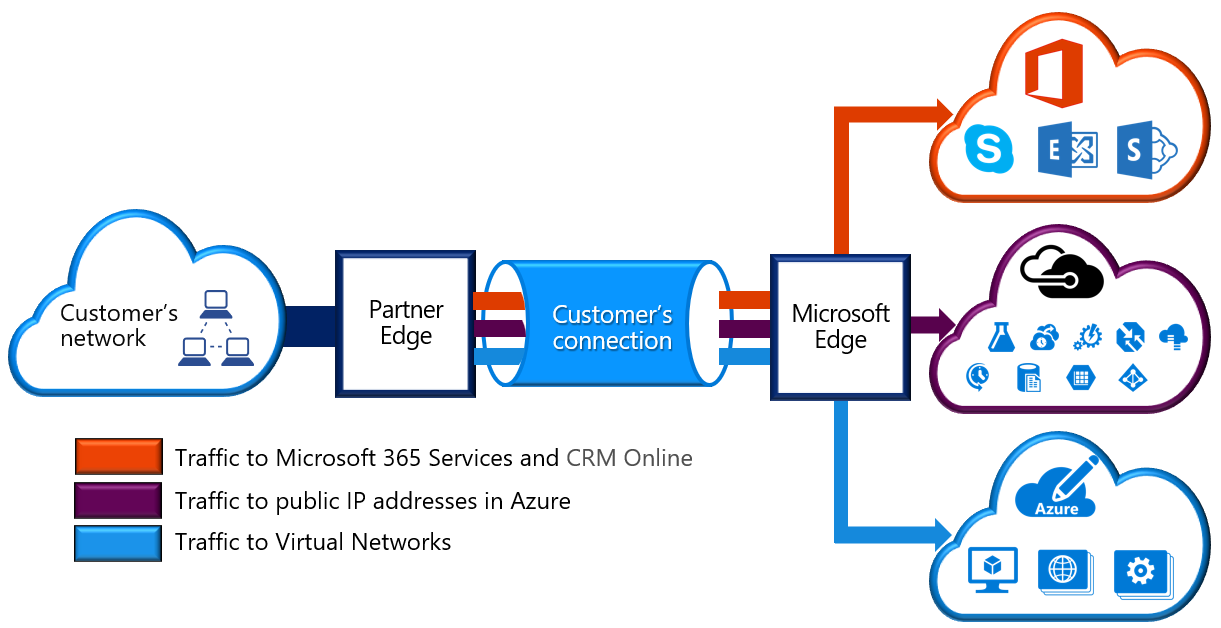
- Layer 3 connectivity between your on-premises network and the Microsoft Cloud through a connectivity provider. Connectivity can be from an any-to-any (IPVPN) network, a point-to-point Ethernet connection, or through a virtual cross-connection via an Ethernet exchange.
- Connectivity to Microsoft cloud services across all regions in the geopolitical region.
- Global connectivity to Microsoft services across all regions with the ExpressRoute premium add-on.
- Dynamic routing between your network and Microsoft via BGP.
- Built-in redundancy in every peering location for higher reliability.
- Connection uptime SLA.
- QoS support for Skype for Business.